AI software development platform

Describe what you want — a team of agents builds the app

AI Tim Studio is a workspace where PO and PM agents run the project, developer agents write code, QA and security check quality, and you have full control through task board, repo, tests, deploy and budget. One place instead of ten different tools.

14 AI agents

8 built-in + 6 extended

Full lifecycle

from specification to deploy

Training included

workshops with AI experts

Project workspace

Project: Sales CRM

32

active tasks

8

agents on team

€420

spend this month

What's happening now

  • PO Agent

    Specification ready for approval

    Waiting for you
  • Backend Agent

    Users API — PR #18

    Review
  • DevOps Agent

    Staging deploy — awaiting approval

    Gate

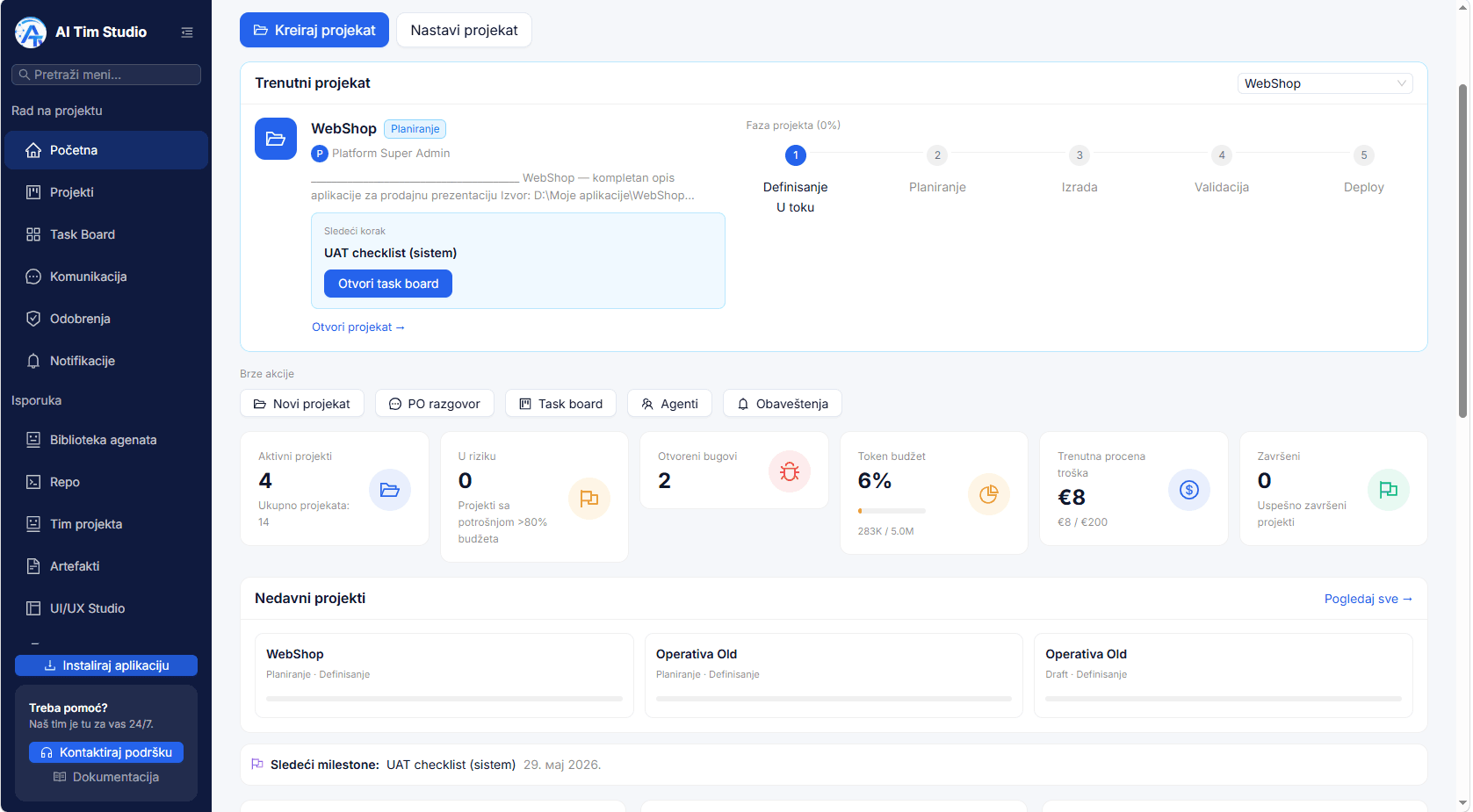
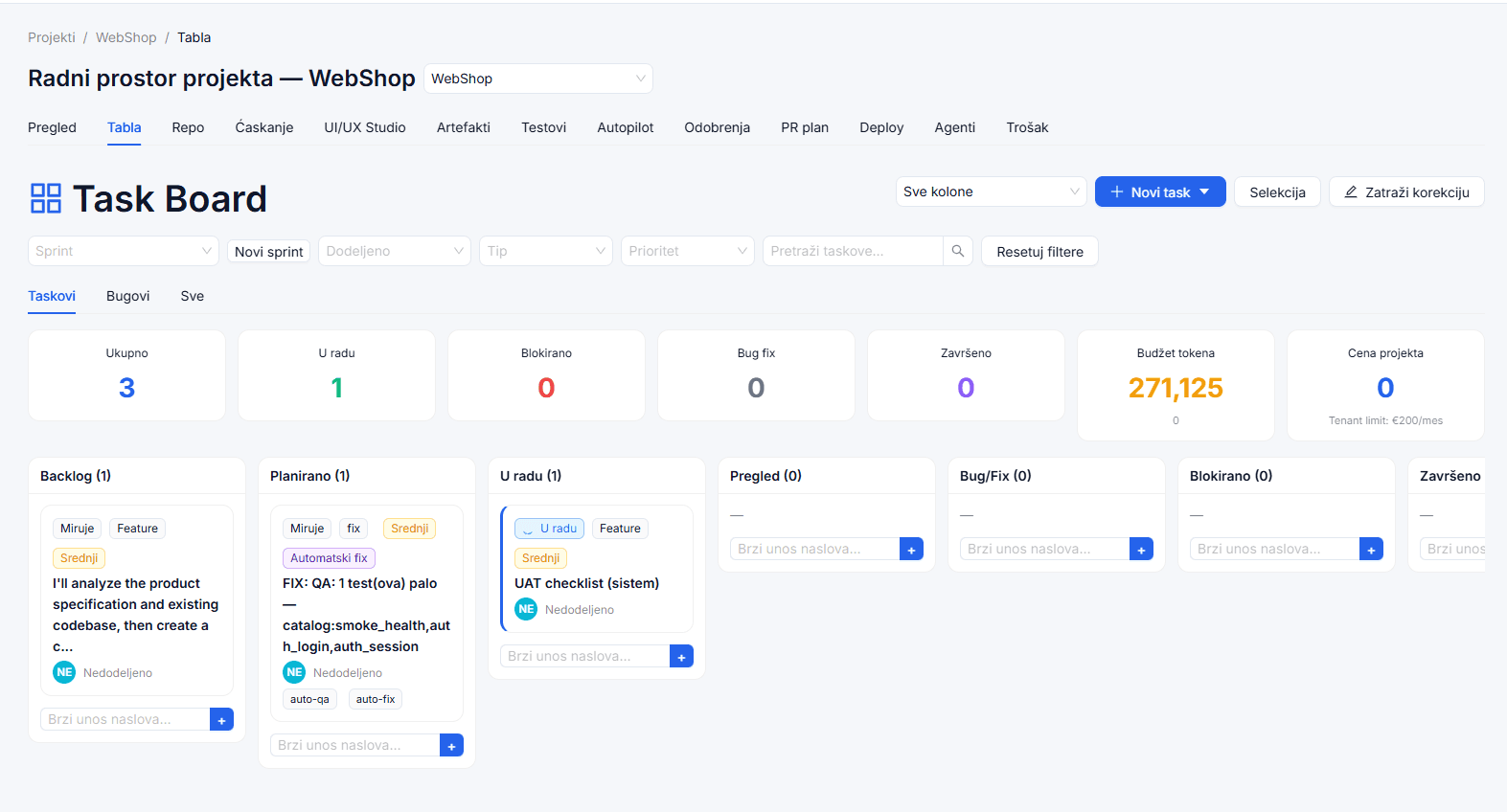
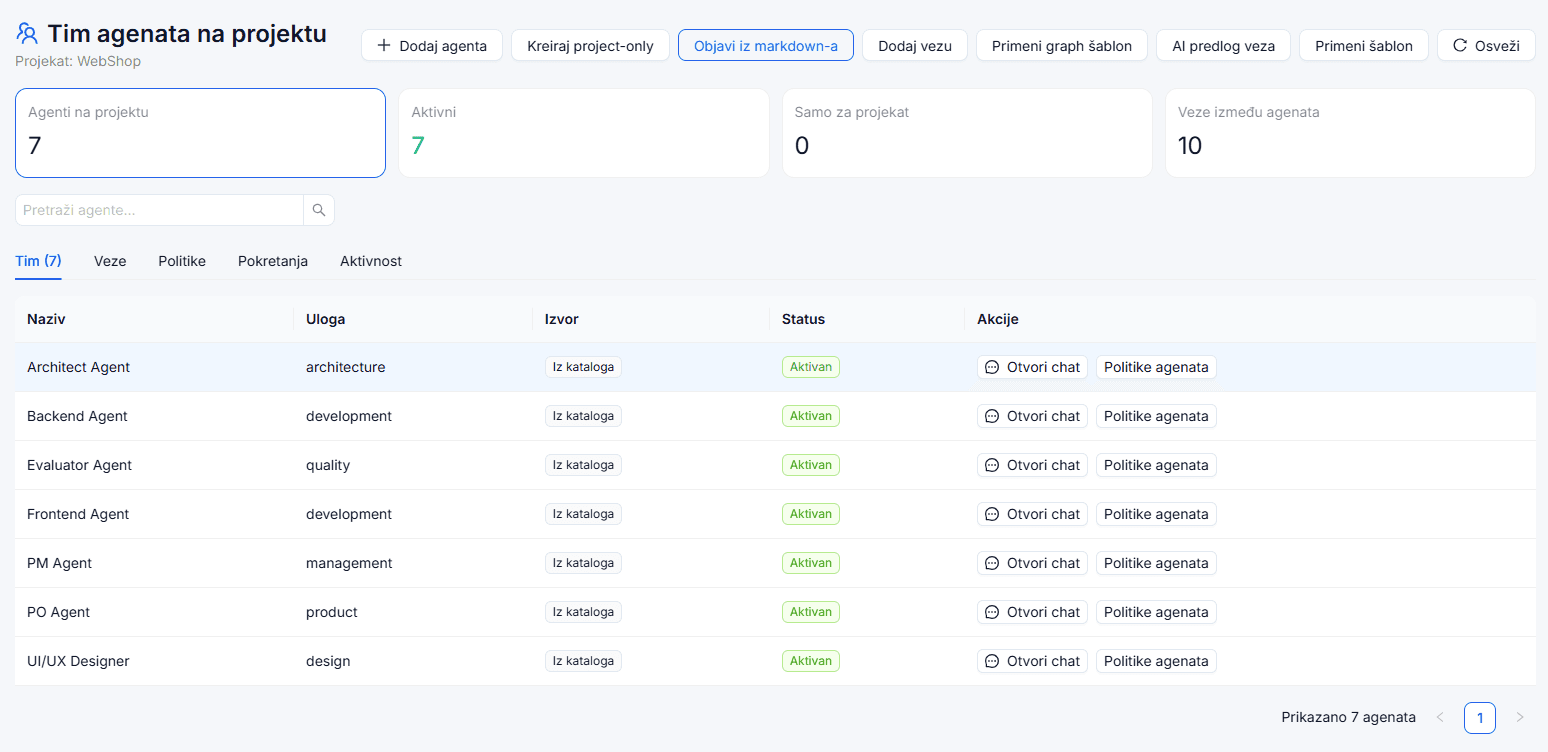
See AI Tim Studio in action

Real screens — projects, AI agent team, task board, communication, cost and UI generation.

Phone, tablet or computer — the same system on every device

Responsive design and PWA: install it as an app on your phone, use it on a tablet or in the browser on your computer — the same experience, everywhere.

AITim Studio — desktop view
AITim Studio — tablet view
AITim Studio — phone view

Why teams choose AI Tim Studio

Copilot and ChatGPT help individuals. AI Tim Studio organizes the whole team — from product owner to deploy — with clear responsibilities and control.

💬

End chat chaos

Instead of ten conversations across different tools, you have one project with PO chat, PM chat, direct chat with each agent and full history.

📋

From idea to production

Specification, plan, architecture, code, tests, security review and deploy — all connected in one workflow with task board and artifacts.

🔐

You decide, not AI

Approval gates for specification, architecture, merge and deploy. Budget limits and warnings. Nothing critical goes live without your approval.

You don't have to be a developer to start a project.

Describe what you need — in text, documents or existing code. PO Agent asks questions and writes specification. PM Agent plans tasks. Developer agents implement. You track progress and approve key steps.

  • New project from scratch

    Describe your idea, upload documents (PDF, DOCX, ZIP) and get specification and plan.

  • Existing code

    Connect Git repo, local folder or archive — platform analyzes stack and suggests agent team.

  • Changes and iterations

    Change Request and Rework tasks for changes on existing project — with full traceability.

  • Cost control

    Token tracking per agent and task, budget simulator and warning at 80% limit.

  • Your way of working

    Customize agent team, policies, approval matrix and workflow template per project.

Team of 14 specialized agents

Each agent knows exactly what it does

Modular team — enable only agents you need. Core team covers standard development; extended team adds domain expertise, analytics, design and cost optimization.

Core team — built into platform (8 agents)

🎯

Product Owner AgentBuilt-in

First contact on the project. Gathers requirements, asks questions, analyzes uploaded files and writes Product Specification with user stories and acceptance criteria.

  • Intake of text, PDF, DOCX, CSV, ZIP
  • User stories with acceptance criteria (FR-001, NFR-001…)
  • Escalation of ambiguities before development starts
📋

Project Manager AgentBuilt-in

Takes over after approved specification. Breaks work into tasks, defines dependencies, sprints, estimates and assigns to the right agents.

  • Kanban plan with priorities and dependencies
  • Effort and token budget estimates per task
  • Coordination of the whole agent team
🏗️

Architect AgentBuilt-in

Designs architecture before writing code: components, tech stack, data model, API surface and ADR documents with decision rationale.

  • Component diagrams and tech stack with rationale
  • Architecture Decision Records (ADR)
  • Human approval gate before implementation
⚙️

Backend Engineer AgentBuilt-in

Implements server-side: REST/GraphQL APIs, business logic, models, database migrations and integrations — with tests and no secrets in code.

  • APIs, services, ORM models, Alembic migrations
  • Tests as part of every task
  • Repo snapshots and PR review workflow
🎨

Frontend Engineer AgentBuilt-in

Builds user interface: components, routing, state management, API integration, responsive layout and accessibility (WCAG).

  • React components, i18n, design system
  • Connection to backend API specification
  • UI tests and accessibility checks
🧪

Evaluator Agent (QA)Built-in

Verifies that what was built matches what was requested. Runs tests, finds bugs, scores code quality and gives verdict with concrete repro steps.

  • Test runs, coverage analysis, bug tasks
  • Quality report with severity classification
  • UAT checklist for client acceptance
🛡️

Security Reviewer AgentBuilt-in

Security audit of code: authentication, authorization, input validation, secrets, injection, dependency risks — by OWASP categories with clear mitigations.

  • Security report: clear / concerns / blocking
  • Integration with platform Bandit SAST scan
  • Automatic fix tasks for critical findings
🚢

DevOps / Delivery AgentBuilt-in

Makes the app deployable: Dockerfile, CI/CD pipeline, environment config, smoke tests and rollback plan for staging and production.

  • Deploy manifest with build and rollback steps
  • Environment promotion (dev → staging → prod)
  • Production deploy gate — requires your approval

Extended team — for more complex projects (6 agents)

🎓

Domain Expert AgentPlanned

Domain expert for regulated and specialized areas (finance, healthcare, e-commerce, GDPR…). Validates business logic and reviews other agents' artifacts.

  • Domain Review Report for PM
  • Validation of business rules before implementation
  • Suggested test scenarios for edge cases
📊

Data Analyst AgentPlanned

Defines metrics, dimensions, reports and analytics specification. Prepares data for dashboards, BI reports and KPI tracking in the app.

  • Analytics Specification in JSON format
  • Input for SQL Administrator and Frontend agent
  • Definition of metrics, filters and aggregations
🗄️

SQL Administrator AgentPlanned

Designs and implements database schema: tables, indexes, constraints, migrations and optimizations. Coordinates with Data Analyst and Backend agent.

  • Database schema specification
  • Normalization, indexes, foreign keys
  • Migrations ready for Backend implementation
✏️

UI/UX Designer AgentPlanned

Creates Design Specification before Frontend agent writes code: wireframe descriptions, user flow, components, responsive rules and accessibility guidelines.

  • Design Spec for every screen and form
  • Mandatory step before frontend implementation
  • User flow diagrams and UX rationale
📐

Estimation AgentPlanned

Estimates effort, time and token cost for new features, change requests and rework. Helps you decide before work starts.

  • Impact estimate of change request on scope and budget
  • Planned vs actual comparison per project
  • Integration with platform Budget Simulator
💡

Token Optimizer AgentPlanned

Optimizes AI consumption: picks minimal context for task, suggests cheaper model for low-risk tasks and warns before expensive operations.

  • Context selection before each agent run
  • Recommendations to reduce cost without losing quality
  • Budget warning and cost breakdown per agent

How a project flows from start to finish

Each step has its agent, artifacts and approval gate where needed. You track progress in real time.

  1. 1

    Specification

    You describe what you want. PO Agent writes Product Spec.

    PO Agent

  2. 2

    Plan

    PM breaks work into tasks with estimates.

    PM Agent

  3. 3

    Architecture

    Tech stack, components, ADR. You approve.

    Architect

  4. 4

    Implementation

    Backend and Frontend work in parallel.

    BE + FE

  5. 5

    QA

    Tests, bugs, quality report.

    Evaluator

  6. 6

    Security

    Security audit before merge.

    Security

  7. 7

    Deploy

    CI/CD, staging, production.

    DevOps

Everything you need — on one platform

Not just AI chat. Full software lifecycle with tools serious teams use.

🚀 Projects and start

🆕

5 ways to create a project

From scratch, Git repo, archive upload, local folder or manual description — with wizard and code analysis.

💬

PO / PM / Agent chat

Talk to each agent separately. Upload files in chat. WebSocket real-time responses.

🤖

Agent library

Choose agent team, team templates, connections graph, policy editor and performance benchmarks.

📊 Work management

📋

Task Board

Kanban with 7 columns, sprints, drag-drop, bulk actions, checklist, comments, change request and rework.

📦

Artifacts

Specifications, architecture, code changes, test results — versioned, with diff and download.

Approvals

Approval matrix per project. Gates for spec, architecture, merge and deploy — you control.

💻 Development and code

📁

Repo & Git

File tree, diff viewer, PR review, branch management, revert, changelog. GitHub/GitLab push and pull.

🧪

Tests & QA

Test runs, coverage dashboard, CSV/PDF export, UAT checklist, automatic bug tasks.

🔒

Security

SAST scan (Bandit), secrets detection, security findings dashboard, fix task creation.

🚢 Delivery and operations

🚢

Deploy pipeline

Environment management, staging → prod promotion, safe merge gates, rollback checkpoints.

💰

Usage & budget

Token tracking per project, agent and task. Budget simulator, estimates, spend charts.

🔔

Notifications

In-app, WebSocket and email: agent finished, budget warning, approval needed, deploy ready.

🏢 Organization and enterprise

👥

Teams and roles

RBAC, tenant isolation, project roles, user management, SSO via OIDC/ZITADEL.

🔍

Global search

Cmd+K search across projects, tasks, artifacts and conversations.

🌐

i18n & PWA

Serbian and English. Progressive Web App — install on desktop and mobile, offline support.

📜

Audit & governance

Audit log, retention policies, PII governance, feature flags, health monitoring.

🏗️

On-Prem & SaaS

Cloud multi-tenant or self-hosted — Docker Compose, Helm chart, license manager.

🎧

Support

Support ticket system, contact form, documentation and help center in platform.

Who AI Tim Studio is for

Anyone building software who wants AI agents to work in an organized way — not chaotically.

🚀

Startups and product teams

Have an idea but no full team? PO and PM agents run the project, developer agents write code, you focus on business and decisions.

🏢

Software houses

Multiple projects, multiple clients, one platform. Multi-tenant, tenant isolation, per-project budget and approval workflow.

👔

Product owners without tech team

Describe what you need in Serbian or English. Agents write specification, plan and code — you approve steps.

🔐

Enterprise IT

On-prem install, SSO, audit log, RBAC, air-gapped mode and license management for regulated industries.

👨‍💻

Developer teams

Use agents as productivity multiplier — repo integration, PR review, test pipeline and deploy stay under your control.

🔄

Teams with existing code

Import Git repo or archive, stack analysis, suggested agent team and iterations through Change Request flow.

What you actually get

Not promises — real platform capabilities you can see in a demo.

📋

Clear work plan

Every task has assignee agent, estimate, dependencies and acceptance criteria — no "AI will figure something out".

📁

Code under control

Repo with diff, PR review, branch management and revert — like a real dev environment.

🧪

Quality before deploy

Automatic test runs, QA report, security scan and UAT checklist before anything goes live.

💰

Transparent costs

See what each agent, task and project costs. Budget limits and warnings before overrun.

You have the final word

Approval gates on specification, architecture, merge and deploy — AI suggests, you decide.

🌐

In your language

Interface in Serbian and English. Chat with agents in both languages. PWA for work from any device.

Included with platform

Training and workshops with AI experts

With the app you also get practical training — not just a license, but knowledge for your team to use it confidently from day one.

  • Team with international experience

    Experts who work for multinational companies and have years of experience implementing AI solutions in production.

  • Workshops, not passive lectures

    Interactive format — your staff work directly in the platform, ask questions and practice what they learn immediately.

  • For the whole team

    Product owners, developers, QA, managers and IT — everyone learns the part of the tool relevant to their role.

  • From tools to agents

    Introduction to platform, project workflow and how to create, customize and coordinate AI agents.

A tool is only as strong as the team knows how to use it.

That's why AI Tim Studio includes training: your people aren't left alone with a new system. Workshops are tailored to your team — online or on-site — focused on real projects and your business processes.

1

Platform introduction

Projects, task board, chat with agents, approvals and budget — hands-on for all roles.

2

AI agents in practice

How the agent team works together, how to choose and configure agents, policies and workflow.

3

Advanced & your project

Creating custom agents, repo integration, deploy pipeline and work on your pilot project.

Flexible hosting

Cloud or self-hosted

Use our cloud service or install on your own infrastructure — same UX, same functionality.

  • SaaS multi-tenant

    Quick start — sign up and create your first project right away.

  • On-Premise

    Docker Compose or Helm chart on your server. License manager with offline validation.

  • Air-gapped

    Fully offline environment for organizations with strict security requirements.

  • Enterprise SSO

    Login via ZITADEL / OIDC — integration with existing identity provider.

Platform is actively evolving.

Core modules — projects, task board, repo, deploy, security, approvals, usage — are implemented and tested. AI agents integrate into the platform; all hooks, gateway and orchestrator are ready.

Early access lets you test the platform before public launch and influence development priorities.

Integrations

Connects to tools your team already uses.

GitHub / GitLab

Repo sync

ZITADEL / OIDC

Enterprise SSO

PostgreSQL

Database

Redis

Real-time & jobs

MinIO / S3

File storage

Prometheus

Monitoring

Bandit SAST

Security scan

Docker

On-Prem deploy

Helm / K8s

Scaling

WebSocket

Live updates

Email

Notifications

PWA

Desktop & mobile

Frequently asked questions

Do I have to be a programmer to use the platform?

No. Product Owner Agent leads the conversation in your language, asks questions and writes specification. You track progress, approve key steps and communicate with agents — programming knowledge isn't required, but useful for code review.

How is it different from ChatGPT or Copilot?

ChatGPT and Copilot help an individual in one conversation. AI Tim Studio organizes a whole team of agents with task board, repo, tests, deploy pipeline, budget and approval gates — from idea to production in one system.

Can I import an existing project?

Yes. Connect Git repo (GitHub/GitLab), upload ZIP archive, connect local folder or describe the project manually. Platform analyzes stack, suggests agent team and enables iterations through Change Request flow.

How many agents can I use?

Core team has 8 agents (PO, PM, Architect, Backend, Frontend, QA, Security, DevOps). For more complex projects extended agents are available: Domain Expert, Data Analyst, SQL Admin, UI/UX Designer, Estimation and Token Optimizer. Choose team per project.

Can I control AI costs?

Yes. Platform tracks token usage per agent, task and project. Set budget limit, get warning at 80%, and Token Optimizer Agent (when active) suggests ways to reduce cost.

Is training included in the offer?

Yes. With the platform you get workshops led by experts with years of experience in AI implementations at multinational companies. Training is tailored to your team — introduction to tool, workflow and creating AI agents, in interactive format for all staff.

Does it support installation on our server?

Yes. Besides cloud version, On-Prem (Docker Compose / Helm) and air-gapped mode are available with license manager, SSO integration and backup/restore.

When will the platform be publicly available?

Platform is in early version — core modules work, AI agent runtime is integrating. Early access and demo are available now; public launch planned after agent integration is finalized.

Ready to see how it works?

Book a demo and walk through the full flow: project creation, conversation with PO agent, task board, repo, tests and deploy pipeline. With the platform you also get workshops with our AI experts — so the whole team can start confidently.